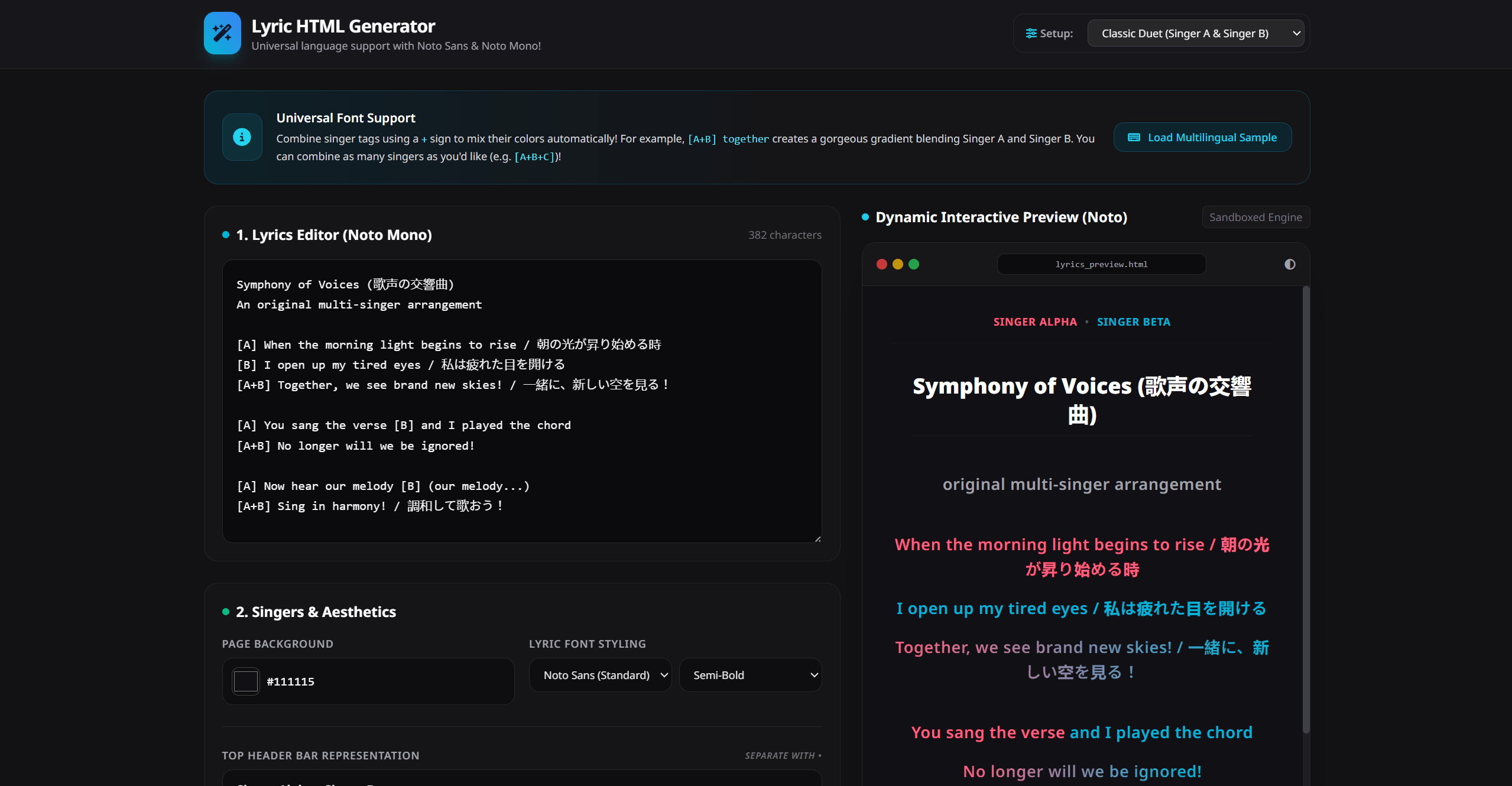
Multi-Singer Lyric HTML Generator
Create gorgeous, customisable, and perfectly formatted colour-coded lyric sheets in seconds! Whether you're coordinating vocal tracks for cover songs, fan translations, virtual choir projects, or just practicing vocal parts with friends, this tool generates a gorgeous, self-contained interactive lyric webpage ready for any device.
🌟 Awesome Features
- 🌈 Dynamic Colour-Mixing Gradients: Combining singers has never been easier! Just combine tags like
[A+B], and the engine automatically blends their colours into a beautiful CSS text gradient! - ⏱️ Mid-Line & Inline Part Support: Add singer tags anywhere within a sentence (e.g.
[A] Hello [B] World [A+B] together!) to change lyric colours mid-line seamlessly. - 🌍 Universal Language Support: Built-in integration with Google Fonts' Noto Sans and Noto Mono ensures that any language script—including Japanese, Korean, Chinese, Cyrillic, Greek, and Hindi—renders flawlessly without errors or broken characters.
- 📱 Real-Time Sandboxed Preview: See exactly how your webpage will look as you type! Includes a quick "Theme Invert" button to preview how light/dark mode matches your aesthetics.
- 💾 Pure Single-File HTML Export: No complicated installations or setup required! Download your finished song as a completely standalone
.htmlwebpage with all styles and custom fonts baked in.
📖 How to Use the Editor
Getting your colour-coded lyrics sheet up and running is as easy as 1, 2, 3:
Step 1: Input Your Lyrics
Type or paste your song lyrics into the Lyrics Editor.
- The first line of your text always becomes the Main Title of your page.
- Use brackets to map singer parts easily. You can do inline lines or full lines:
Your Song Title Here
[A] When the morning light begins to rise
[B] I open up my tired eyes
[A+B] Together, we see brand new skies!
[A] You sang the verse
[B] and I played the chord.
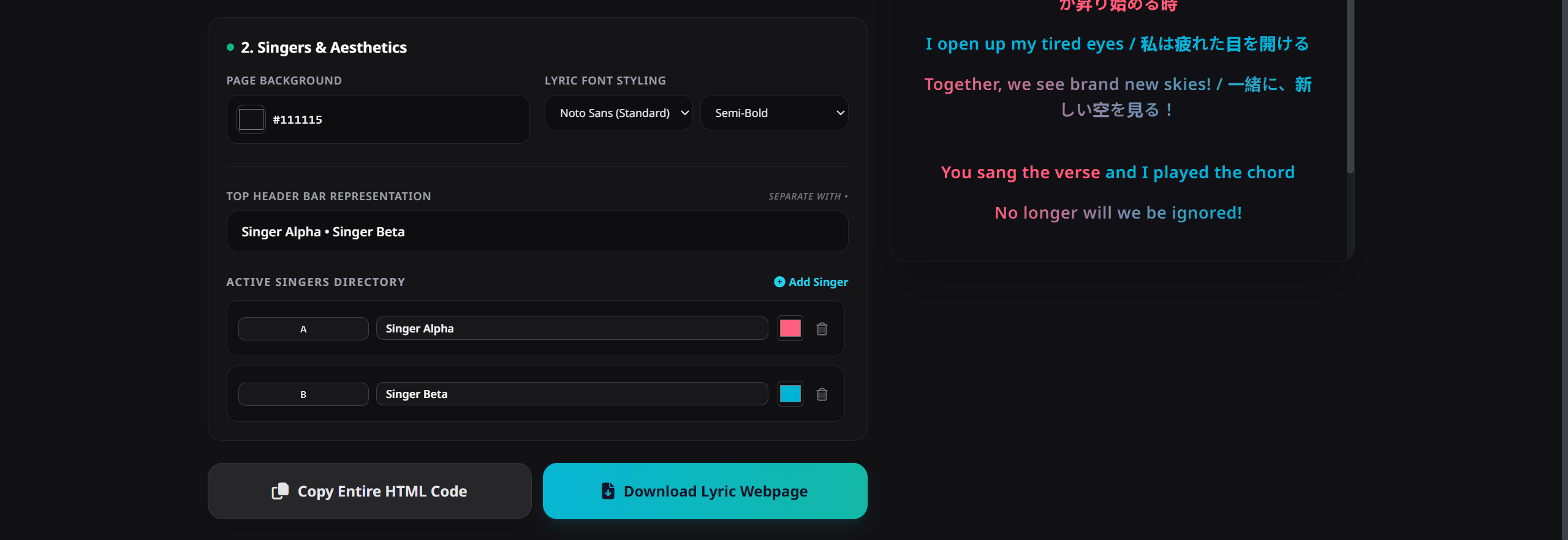
Step 2: Configure Your Singers & Styles
- Active Singers Directory: Create singer rows with unique shorthand abbreviations (like
A,B,S,T), set their full names, and pick their distinct colours with the visual colour wheel. - Top Header Bar: Customise the navigation list at the top of the lyrics page to match your arrangement.
- Background & Fonts: Tweak your background colour and text thickness (
Regular,Semi-Bold, etc.) to find the perfect look.
Step 3: Export Your Masterpiece
- Click Copy Entire HTML Code to paste it directly into your website or blog.
- Click Download Lyric Webpage to save a fully functional standalone webpage file (
.html) to share with friends, choir members, or castmates!
🛠️ Offline Support & Developer Notes
This tool is constructed entirely out of clean, modern vanilla HTML, CSS, and JS.
- Zero External Dependencies: No bulky web frameworks or scripts to load.
- Fully Responsive: The output web page adapts beautifully to mobile phones, tablets, laptops, and desktop browsers.
- Google Fonts Integration: The exported files load the highly compatible Noto font families to keep your text crisp, smooth, and easily readable on any screen resolution.
🎁 Great For:
- Cover Artists & Vocal Units: Quickly organise vocal distribution for multi-part choruses or duets.
- Utaite & Virtual Singers: Colour-code parts for group collaborations.
- Languages & Translation: Create bilingual learning sheets (original text on left/top, translations alongside/below).
- Music Teachers & Choirs: Simplify visual part tracking (Soprano, Alto, Tenor, Bass) for students!
Made with love for musicians, creators, and developers. Free to use, edit, and share!